
Fee management software that closes the books, not just prints receipts
Fee heads, structures, instalments, concessions, fines, online payment and receipts — with a real double-entry ledger underneath, so the collection figure and the trial balance are the same number.
What ships in fees & finance
Counted from the software, not the brochure.Set it up once so next year is a revision, not a re-entry
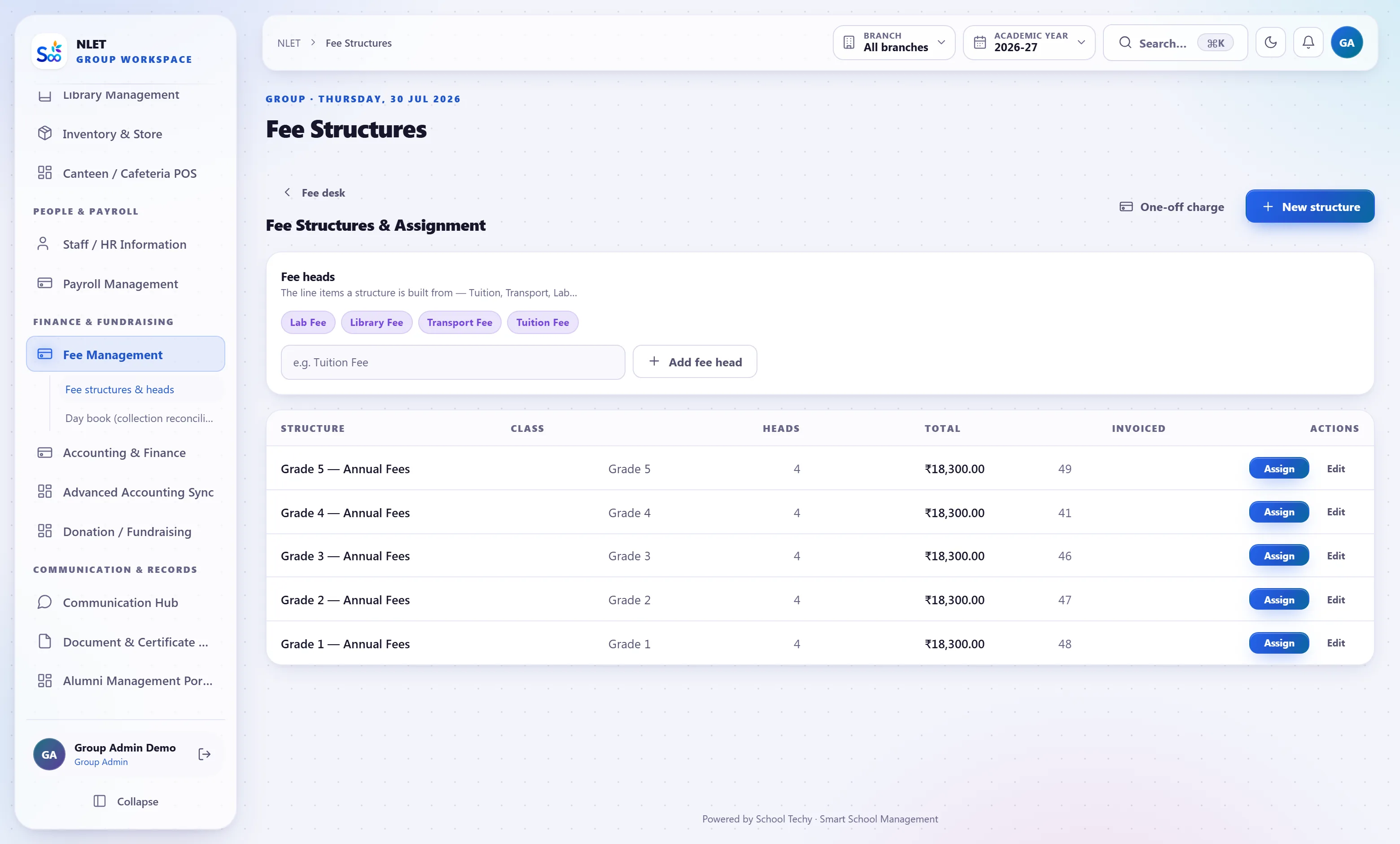
The distinction that decides whether your fee setup survives a year: a fee HEAD is one chargeable item — tuition, transport, lab, exam. A fee STRUCTURE is the combination assigned to a class, with instalment dates. Keep them separate and the annual revision is a ten-minute job. Fold them together, as most schools do in a spreadsheet, and every change means rebuilding everything.
- 01 Heads, structures and instalments are separate things Raise tuition by 8% and every structure that uses it follows. Change one class’s instalment dates and no other class moves.
- 02 Transport and hostel as add-ons, not base fee A student who stops using the bus is removed from that head. They do not need a new fee structure, and the previous receipts stay valid.
- 03 Concessions with a reason and an approver Sibling discount, staff ward, RTE, merit, trustee-approved hardship. Each concession records who approved it and why, and appears as a reversal in the ledger rather than a quietly smaller invoice.
- 04 Fines that calculate themselves Flat or per-day late fees with a grace period, applied on the due date. Waivable per student with the waiver recorded.
This is the part most school software does not have
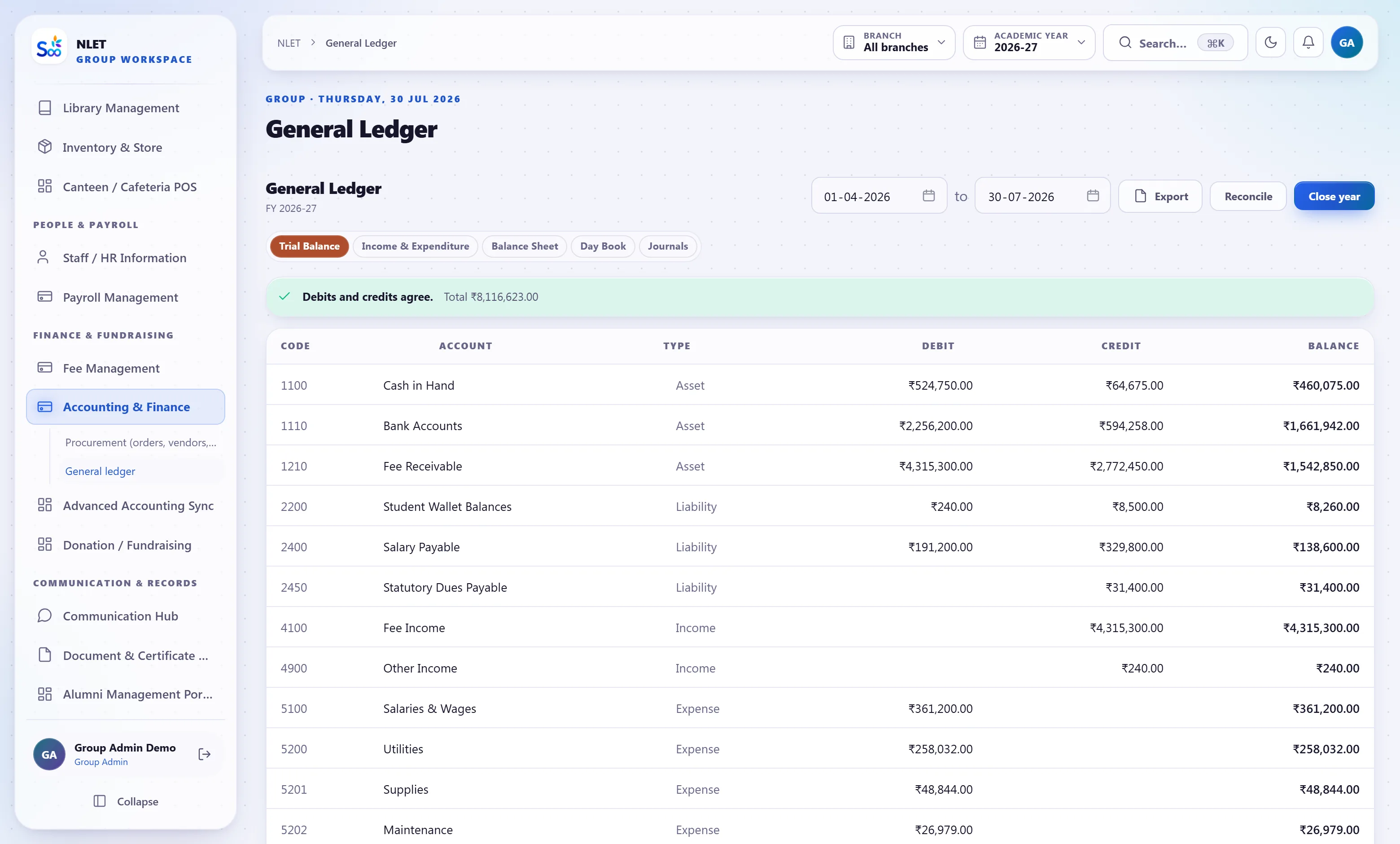
Printing a receipt is easy. Producing a trial balance that ties to those receipts a year later — when the concession was reversed, the cheque bounced and somebody backdated an entry — is the hard part, and it is the part an auditor asks about. So the accounting here is not a report built by summing receipts; it is a general ledger that the receipts post into.
- 01 Event-driven journals Invoices, payments, refunds, concessions, credit notes, vendor bills and payroll each post a balanced journal entry as they happen. Nothing is posted by a nightly job that can be missed.
- 02 Accounting periods that close Lock a period and nobody backdates a receipt into it. This is the single most common way school books stop reconciling, and a lock is the only thing that actually prevents it.
- 03 Statements are derived, never typed Trial balance, income and expenditure, balance sheet, day book, account ledger and cash flow all read the journal. If the trial balance does not balance, something is genuinely wrong rather than out of date.
- 04 Credit notes instead of edited history A wrong invoice is corrected by a credit note that both entries reference. The original stays, which is what makes the audit trail worth having.
Chasing dues without a phone tree
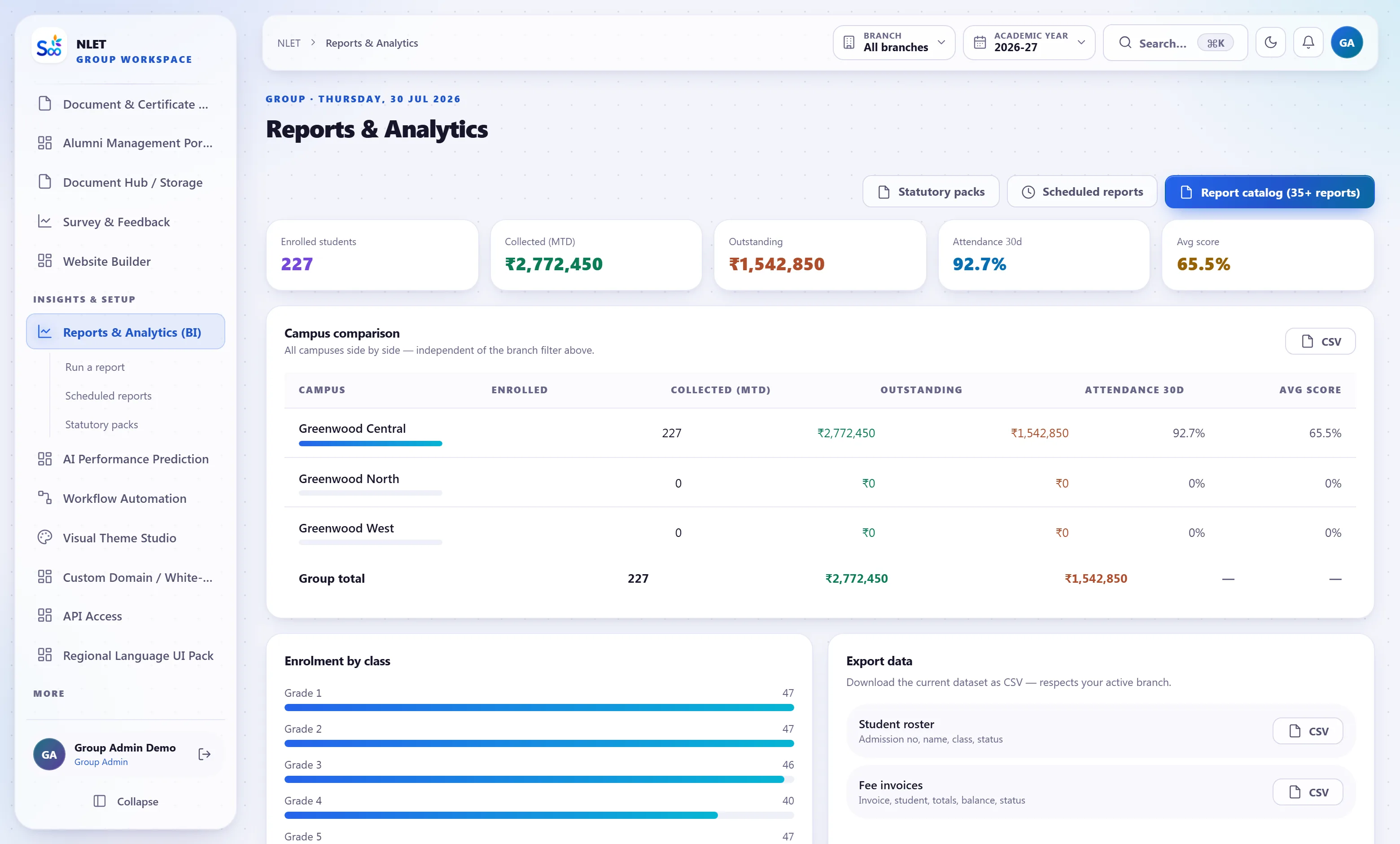
Outstanding fees are visible the moment you want them — by class, by student, ranked by amount and by how long overdue. Reminders go out on a schedule you set, on WhatsApp, SMS or e-mail, and the parent can pay from the message. The ones who need a phone call are the ones left after that, which is a much shorter list.
- 01 Live outstanding, not a monthly report The figure updates as receipts are entered. Ask Buddy for “fee dues per class” and you get it as a number rather than a request to the accounts office.
- 02 Online payment with the reconciliation attached The gateway settlement, the receipt and the ledger entry are linked. “I already paid” takes ten seconds to answer, with the transaction reference.
- 03 Part payment and adjustment Take what a parent can pay now against the oldest instalment first, or against a head you choose. Advances sit as a credit and apply to the next invoice automatically.
- 04 Cheque, cash, NEFT and UPI all end up in the same place Offline modes are recorded with their instrument details and post to the right bank or cash account. A bounced cheque reverses cleanly rather than being deleted.
Everything in the fees & finance module
How a fee year actually runs
What this module does not do
Stated here so it comes up now rather than in month three. If one of these is a hard requirement, tell us on the call and we will say plainly whether it is on the roadmap or not for us.
| You might expect | What we actually do | Status |
|---|---|---|
| Payroll processing for a payroll bureau | Full in-house payroll with PF, ESI, TDS and payslips — but not filing returns on your behalf | By design |
| Replacing Tally entirely | A complete general ledger and statutory statements; most schools stop using Tally. Export to Tally-compatible formats if your CA insists | Supported |
| Automatic bank statement reconciliation | Gateway settlements reconcile automatically. Bank statement import and matching is manual today | Not yet |
| GST return filing | GST-correct invoices, rates and reports. The return itself is filed by your CA | By design |
| Fee prediction or credit scoring of parents | Defaulter ageing and history. No scoring model, and we would not add one | Not for us |
| Multi-currency fees | INR only. International schools billing in USD should tell us before buying | Not yet |
What fees & finance is wired to
Nothing here is a separate product with an import step. These modules read and write the same student record, which is the entire point.
Fees & finance — questions we get asked
Something not answered here?
Can we import last year’s fee structure and outstanding balances?
Does it really do double-entry, or is it a report that adds up receipts?
Which payment gateways do you support, and who bears the charge?
Can different classes have completely different fee structures?
How do you handle GST on transport and hostel?
What happens when a cheque bounces?
Can parents see exactly what they owe and pay it themselves?
Can we stop a report card if fees are unpaid?
See your own fee structure in it
Send last year’s structure and an outstanding list. We load them before the call so you are checking your own totals rather than watching a sample school.
- No card required
- Your data stays yours — export any time
- Setup help included